
ONE PLATFORM. EVERY OPERATION.

Every movement.
Every margin.
Connected.

A connected operating system for freight, customs, warehousing, transport and the finance and people behind every job.

01 — ∞From the first booking
to the final invoice.
A WORLD OF MOVEMENT.
ONE OPERATIONAL PICTURE.
Rotterdam51.92° N · 4.48° E
Jeddah21.49° N · 39.18° E
Singapore1.35° N · 103.82° E
Illustrative route network
BUILT FOR THE WAY LOGISTICS WORKSSCROLL TO CONNECT THE DOTS
Freight forwardingCustoms clearanceWarehousingTransportationEvent logisticsFinance & people

01 / THE PLATFORM

One operation.
One shared picture.

Separate tools leave teams re-entering data and reconciling the gaps. Vextech connects the job, customer, stock and costs, so the next team starts with the full context.
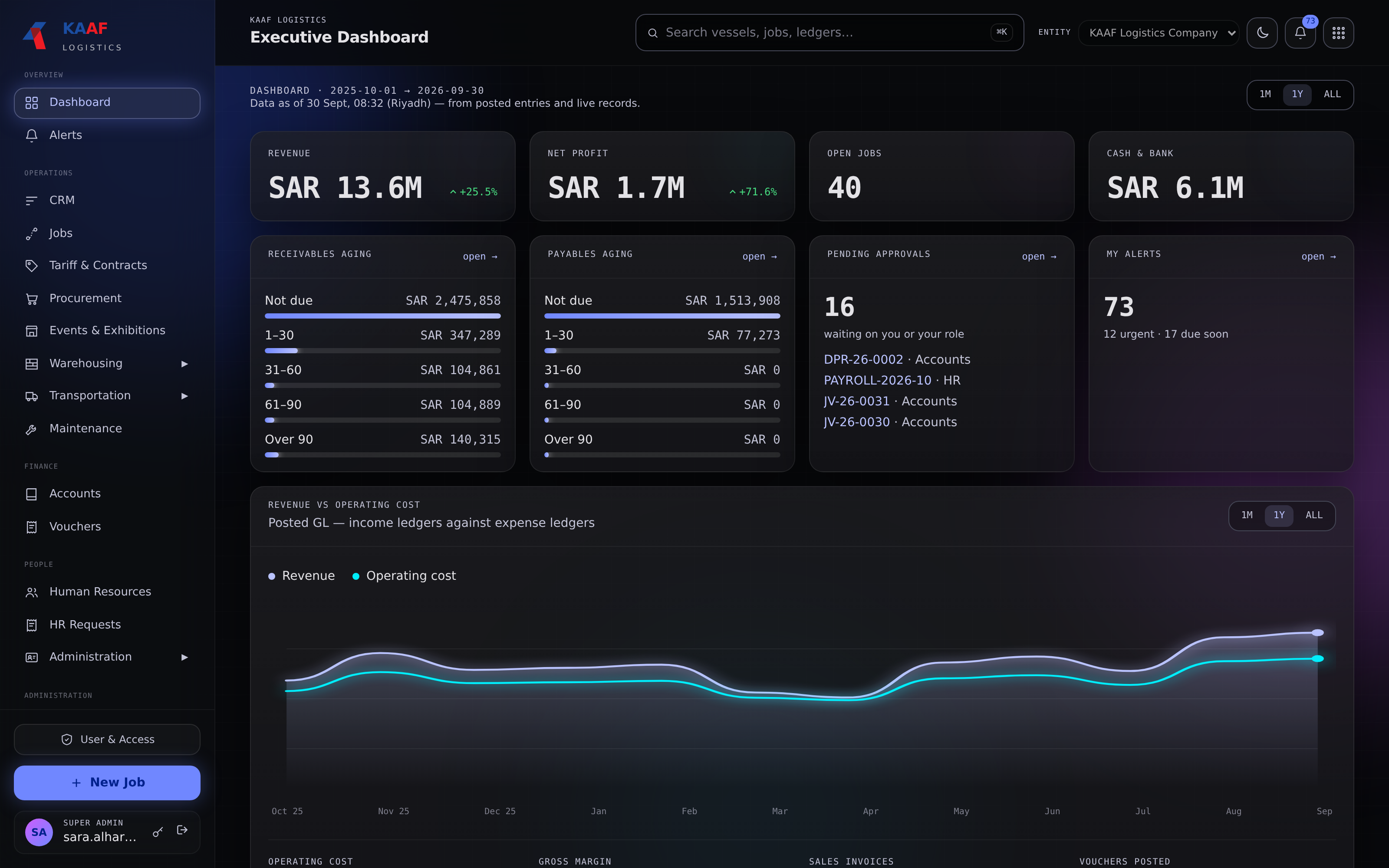
Executive dashboard
The executive dashboard in dark mode, bringing revenue, profit, open jobs, receivables, approvals and operating costs into one screen
Financial visibility. Operational context.KAAF Logistics workspace
01

See the whole job.

Bookings, milestones and documents stay connected from origin to delivery.

FREIGHT OPERATIONS
02

Know where stock stands.

Trace receipts, transfers and dispatch through one inventory movement history.

WAREHOUSE MANAGEMENT
03

Keep margin in view.

Bring operational costs and sales into the same view of job profitability.

CONNECTED FINANCE

Shared records. Connected decisions. From the people moving cargo to the people closing the books.

Container vessel alongside a working freight terminal at blue hour

BUILT FOR REAL-WORLD LOGISTICS

Big movements.
No small details.

At the port. On the road. On the warehouse floor.
The work changes hands. The context stays with it.

02 / THE CONNECTED WORKFLOW

One job.
The whole journey.

Give operations and accounts a shared record, with clear responsibilities at every stage.

01COMMERCIAL

Book.

Carry the quotation, customer, agreed rates and documents into the job.

Booking·Job record
02OPERATIONS

Move.

Coordinate procurement, stock, crew, equipment and truck placements.

Warehouse·Transport
03DELIVERY

Deliver.

Capture milestones, signatures and proof of delivery against the job.

Milestones·POD
04FINANCE

Reconcile.

Review the costsheet, invoice the job and close with separate operations and accounts checks.

Costsheet·Close

THE JOBS WORKSPACE

Every job.
In clear view.

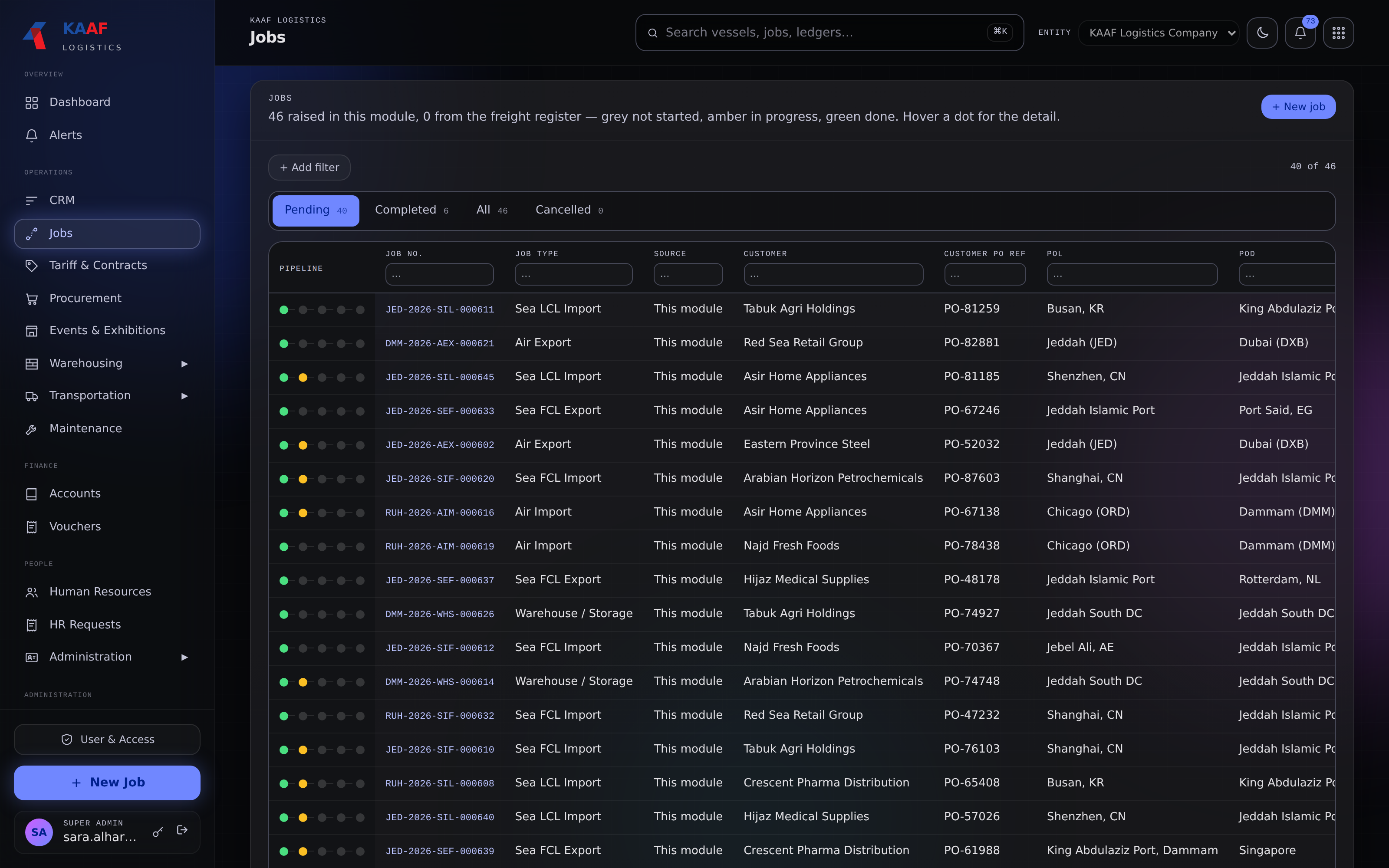
See the pipeline across your operation. Find the customer, route and milestone progress without losing the bigger picture.

  • Pending and completed jobs
  • Customer and route filters
  • Milestone progress at a glance
Job managementOPERATIONS
The Jobs workspace showing pending and completed jobs, customer and route filters, and a milestone pipeline for each shipment
From the first booking to the next milestone.

03 / THE PLATFORM MODULES

Built for the whole
logistics business.

Ten areas of work, connected by shared records, permissions, approvals and job costs.

01

Freight forwarding

Every mode, from quotation to close.

Manage the complete freight job with shipment details, commercial terms and profitability in one workspace.

  • Sea FCL and LCL, air, land, multimodal, break bulk and Ro-Ro, with configurable fields for each job type.
  • Multi-leg routes, containers, vessel and voyage details, BL and AWB references, and Incoterms.
  • General tariffs and customer or vendor contracts carry agreed rates into the job.
  • Quotation, procurement, receipts, costsheet, invoice and close follow one lifecycle, with pass-through charges tracked separately.
02

Customs clearance

Clearance and freight, in the same job.

Keep declarations, supporting documents and reimbursable charges alongside the operation they belong to.

  • Capture declaration and Bill of Entry details, plus Bayan, Fasha and Waybill references.
  • Attach customs documents and keep their references with the job.
  • Use import, export and domestic VAT classifications with suggested reason codes for review.
  • Bring clearance charges and statutory reimbursements through the shared procurement, pass-through and costsheet workflows.
03

Terminal & port operations

Port milestones with operational context.

Connect freight jobs and transport planning through shared port information and movement milestones.

  • Follow Gate In, Gate Out and Empty Return milestones.
  • Use common port, terminal and shipping-line reference records across freight and transport.
  • Build on the location hierarchy that already supports warehouse movements.

Planned extension: a dedicated terminal and yard interface for slot management.

04

Warehouse management

Trace every pallet, carton and unit.

A complete warehouse workflow from booking and receipt through quality checks, storage and dispatch.

  • Parent–child inventory connects pallets and cartons to serialized items, with batch, container and location history.
  • Booking, goods-in, QC, putaway, stock and goods-out share one shipment pipeline. Transfers follow goods issue, in-transit and goods receipt.
  • Floor maps, QR codes, mobile camera scanning and Bluetooth scanners support work on the warehouse floor.
  • Resolve overages, shortages and damage with customers; manage cycle counts, quarantine, returns and disposal with an inventory audit trail.
  • Connect service orders, storage rates and free days, and calculated consumable usage to job costs and billing.
05

Events & exhibitions

One show. Every exhibitor accounted for.

Run exhibition logistics on the same job, warehouse and finance workflows as the rest of the operation.

  • Give each exhibitor a sub-job, with its own bookings, receipts, stock and dispatch.
  • Carry exhibitor, hall and stand details through shipments and QR labels.
  • Track goods from origin to temporary storage, the event hall, then return, disposal or direct delivery.
  • Coordinate crew, equipment, timesheets, truck placements and on-site expenses, with show-level costs, sales, profit and approvals.
06

Transport management

Dispatch with the whole trip in view.

Coordinate owned fleets and transport partners, with the people, documents and costs behind each placement.

  • Assign coordinators manually, by branch or region, or by workload, and compare suppliers by lane, rate and service history.
  • Review estimated trip profit using sales, fuel, driver payouts and maintenance provision, with return-trip and multi-drop opportunities.
  • Capture photos, signatures and location updates through the driver portal, with trip funds and expense claims.
  • Follow GCC border crossings, Bayan references and customs documents; resolve cancellation, damage and demurrage disputes.
  • Keep vehicle-document expiry and odometer-based maintenance in view.
07

CRM & quotations

Carry the commercial promise into delivery.

One quotation workflow for freight, warehousing and events, connected to the rates and contracts behind it.

  • Build line-item quotations with charge heads, descriptions, rates, VAT classifications and terms templates.
  • Convert approved quotations into jobs with their commercial context intact.
  • Connect quotations to contracts and general tariffs, so pricing stays consistent through invoicing.
08

Accounts & finance

The numbers stay close to the work.

Connect purchasing, job costs, billing and payments with clear approvals and financial accountability.

  • Follow purchase orders, receipts, supplier invoices and pass-through charges into costsheets and billing.
  • Manage advances, reimbursements, supplier payment runs and driver or crew payouts in one payable workflow.
  • Separate operational completion from financial close, with accrual entries, approval bands and audit records.
  • Use configured VAT classes, invoice workflows and document-numbering rules, including formats and year resets.
09

HR & payroll

People operations, connected to job costs.

Keep employee records, requests and payroll together, with approvals that follow your reporting structure.

  • Manage employee documents, licences, benefits and line-manager relationships.
  • Configure payroll by country, separating salary expense from job-related operational costs.
  • Review and approve GOSI and end-of-service provisions alongside other financial records.
  • Handle leave, advances, loans and resignations in one requests hub, with balances, history and context for approvers.
10

Administration & governance

Consistent records. Clear responsibility.

Give every team the shared data, access controls and operational safeguards it needs.

  • Track company documents, driver licences, vehicle registration and insurance expiry in one place.
  • Maintain editable master data, configured roles and saved user filters across modules.
  • Bring historical data, current stock and open transactions into the platform with traceability to legacy records.
  • Keep approvals and activity history connected to the work they govern.

THE WAREHOUSE WORKSPACE

Know what’s waiting.
Know what’s next.

Bring work queues, exceptions and available space into one warehouse view, with the next action close at hand.
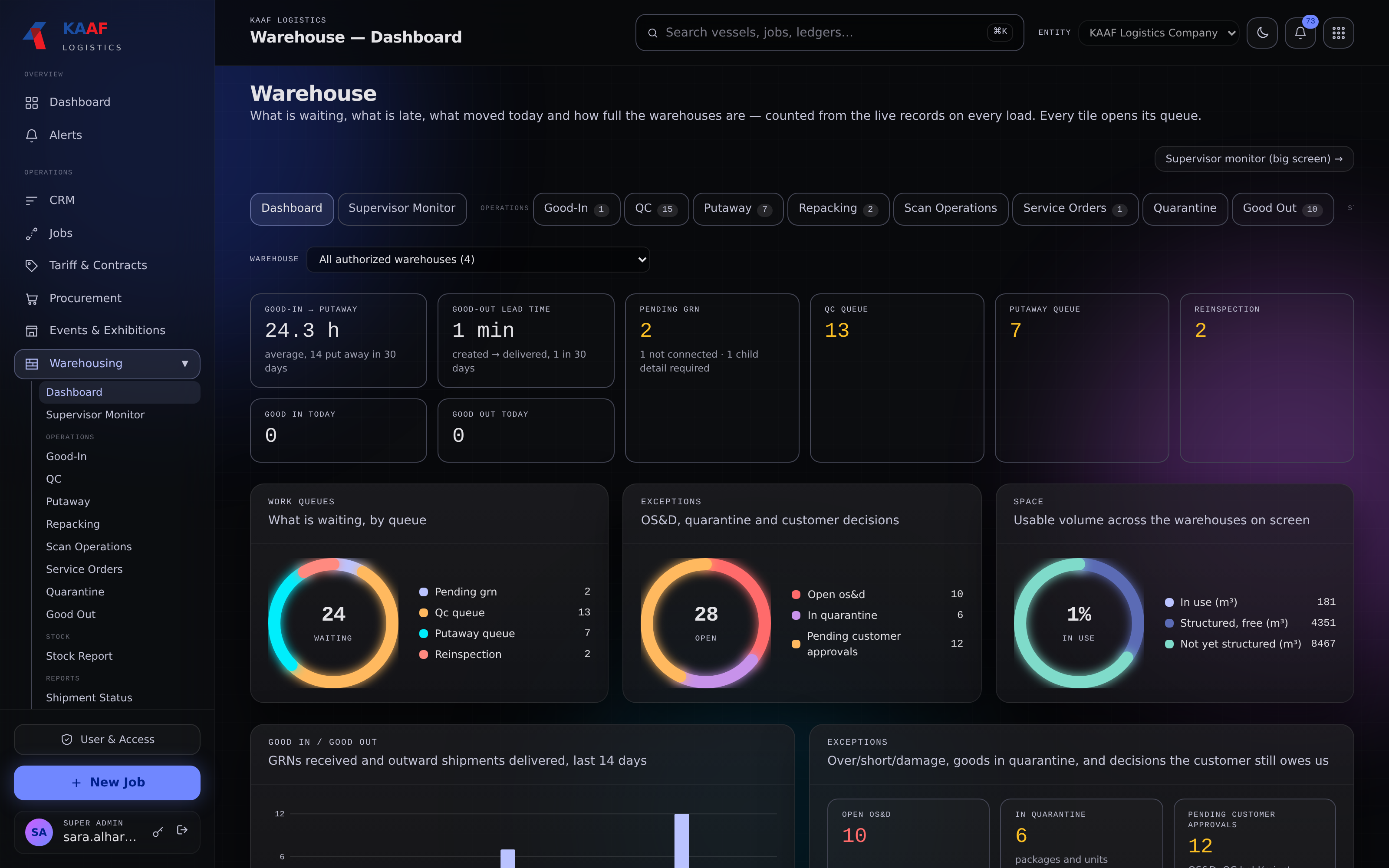
  • Goods-in, quality checks and putaway
  • Quarantine and exception queues
  • Warehouse space and movement
Warehouse dashboardWAREHOUSING
The warehouse dashboard showing goods-in and goods-out queues, quality checks, putaway, exceptions and available warehouse space
Work queues, exceptions and space. Together.

04 / INTELLIGENCE

Intelligence built on
connected data.

Useful intelligence starts with reliable records. Vextech brings jobs, stock, routes and costs into the same operational context.

THE FOUNDATION TODAY

Tariff-driven pricing. Storage billing rules. Smart consumable calculations. Supplier ranking. Workload-based dispatch.

AI ROADMAP

The next layer of assistance across documents, planning, reporting and support.

01

Document intelligence

Extract details from packing lists, bills of lading, declarations and delivery notes to assist booking and goods receipt.

02

Compliance assistance

Surface possible VAT classification issues and missing customs documents for review before submission.

03

Predictive ETA

Combine location updates with historical route performance to improve arrival estimates.

04

Demand & capacity

Anticipate warehouse space and truck capacity needs from booking history and seasonal patterns.

05

Anomaly detection

Highlight unusual fuel claims and cost variances in the context of each vehicle, route and driver.

06

Supplier & lane recommendations

Use patterns across comparable lanes to help coordinators assess transport partners.

07

Natural-language reporting

Find operational answers with a plain-language question instead of building a filter.

08

Portal support assistant

Help customers, vendors and drivers find answers in the context of their shipment or job.

05 / THE PORTAL ECOSYSTEM

Every partner.
Their own workspace.

Purpose-built views, a shared sign-in framework, and role-based access to the records each party needs.

01

Customer portal

Give customers a clear view of their own operation.

Follow shipments, ETA and border status; review stock, bookings, quotations, invoices and statements. Approve warehouse exceptions and service orders in context.

Shipments · Stock · Approvals
02

Vendor portal

Keep partners connected to the work they deliver.

Share assigned trips or purchase orders, crew timesheets, invoice and payment status, statements and disputes, with views configured for each vendor type.

Assignments · Payments · Disputes
03

Driver portal

A clear next step, from loading to delivery.

An icon-first trip timeline with photos, signatures, location updates and a trip-money wallet. Available in Arabic, English, Urdu and Hindi.

Trips · Proof of delivery · Wallet
04

Exhibitor portal

Every shipment, in the context of their stand.

Let exhibitors follow their packages by hall and stand, submit advance shipment notices, and give return or disposal instructions after the show.

Packages · Hall & stand · Returns
ADMIN VIEW AS

A read-only preview of each portal experience, without submitting an approval, signature or other action.

06 / WHY VEXTECH

Built as one.
Built around your work.

Operational depth in each module.
A shared foundation across them all.

01 / CONNECTED CORE

One system.
Shared context.

Freight, warehouse movements, transport and finance work from connected operational records.

02 / GCC WORKFLOWS

Regional detail.
Built into the work.

Bayan and Fasha references, border milestones, VAT classifications, and payroll provisions are part of the platform.

03 / WAREHOUSE DEPTH

Beyond stock counts.

Serialized inventory, floor maps, scanning and a structured shortage-and-damage resolution workflow.

04 / PRACTICAL DISPATCH

Built for the people
moving the freight.

Profitability-aware placements, supplier history and a clear, multilingual driver experience.

05 / INTELLIGENCE

A foundation
for useful AI.

Structured jobs, rates, movements and costs give intelligent assistance the context it needs.

A FEW THINGS TO KNOW

The details
matter.

What does Vextech Logistics Cloud cover?

Freight forwarding, customs clearance, warehousing, transport, exhibition logistics, CRM, finance, HR and administration, with customer, vendor, driver and exhibitor portals. Port milestones are supported; a dedicated terminal-yard interface is planned.

How do operations connect to job profitability?

The job costsheet brings purchase, warehouse and transport costs into the same view as sales and margin. Operational completion and accounting close have separate checks and approvals.

Can customers see their own stock and documents?

Yes. Customer access is scoped to their bookings, stock, documents, invoices, statements and movements. Customers can also review quotations and contracts, submit requests and respond to warehouse exceptions.

Can the workflows fit our business?

Company setup, job types, numbering, document templates, roles, tariffs, warehouses and reference masters are configurable. The rollout and module scope can be matched to your operation.

VEXTECH LOGISTICS CLOUD

Bring your operation
together.

Start with the workflows that matter.
Grow on one connected platform.
Explore the modules
VEXTECH LOGISTICS CLOUD

Software screenshot

KAAF Logistics workspace · Software screenshot